A shared inbox stops double replies by giving every chat one owner and keeping each buyer's messages in one thread. Decide who owns a chat and assign it before anyone answers. Once ownership is clear, the team stops stepping on each other and buyers stop getting two different answers.
Why double replies happen without a shared inbox
Chat sellers who add a second or third person usually add them to the same phone, the same Facebook Page, or a group chat. Everyone can see the message, so everyone can answer it, and nobody knows whether someone already has.
The second cause is the channels themselves. WhatsApp, Messenger, and a website chat each keep their own inbox, so a buyer who writes on two of them looks like two different customers. Notebook vs AI order desk for chat sellers describes how much of the day goes into stitching those apps together by hand.
Neither cause means the team is careless. When ownership is not written down anywhere, two people who both want to help will answer the same chat.
What double replies and missed chats cost
The visible cost is a buyer who receives two answers to one question, sometimes with two different prices or two different delivery promises. The buyer then has to work out which one is true, and some will simply stop replying.
The hidden cost goes the other way. When everyone assumes someone else has a chat, nobody answers it, and an unanswered message is usually a lost sale. Lost orders in chat: why they happen and how to stop them covers that problem in more detail.
There is also a cost in knowledge. If one buyer's history is split across three apps and two people, nobody can see what that buyer bought before, so every conversation starts from zero.
Step 1: Put every channel in one inbox
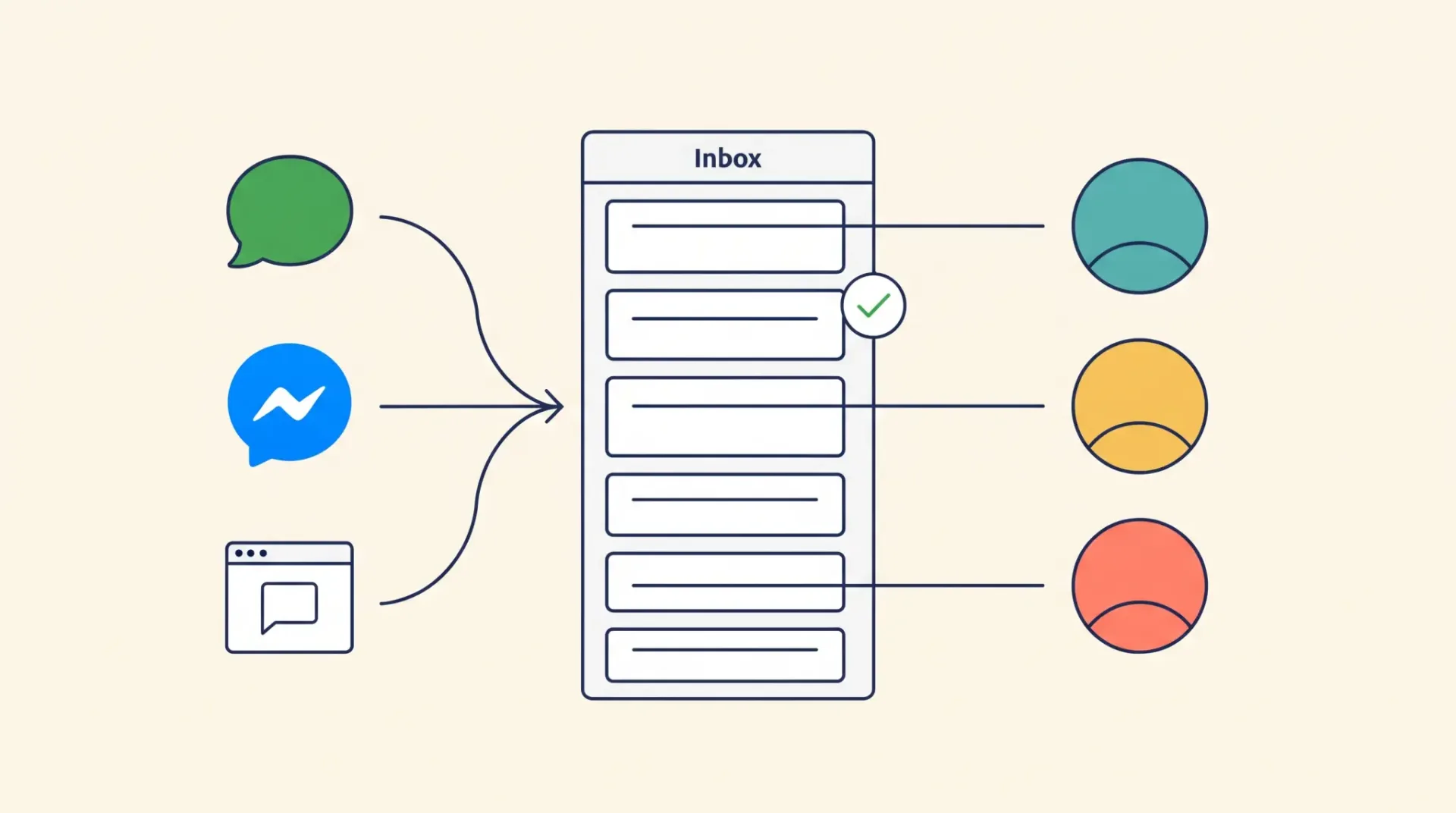
Start with one rule: the team reads chats in one place, not in three apps. Bring WhatsApp, Messenger, and your website chat into a single inbox, and treat every other app as closed for replies.
Keep one thread per buyer, with all of that buyer's messages from every channel together. A returning customer who switches from Messenger to WhatsApp should land in the same thread, so whoever answers sees the full history instead of half of it.
Step 2: Give every chat one owner
Before anyone replies, assign the chat to a named person. The owner answers it, and everyone else leaves it alone unless the owner hands it over.
Use filters to make this routine. A view of all chats, a view of mine, a view of unassigned chats, and a view of unread chats are enough for most teams. Check the unassigned view at the start of each shift, and aim to leave it empty.
Ownership also works for the AI. You can assign a chat to the AI for the first reply and step in whenever a person is needed, and the AI stays out of the way once you reply yourself.
Step 3: Set roles so people only do their part
Decide in advance who may reply to chats, who may confirm orders, and who may record payments. Writing this down takes a few minutes and prevents most of the arguments later.
A simple split is an owner who sets prices and policies, a manager who handles exceptions, and agents who reply and capture orders. Assign orders to people the same way you assign chats, so every order has one person responsible for it.
Give one person the job of confirming COD orders before dispatch. The routine in Reduce COD returns for Facebook and WhatsApp sellers works well as that person's checklist.
Step 4: Decide which chats must reach a person
Not every chat should be answered by whoever is free. Agree on the situations that go straight to a person: an angry customer, a refund demand, abuse, or a threat. Decide who receives each kind, so the chat does not wait for someone to volunteer.
The same list applies if an AI answers the first message. It can draft the order while you keep the decision, and the sensitive chats should always come to you first. Can you trust an AI to take orders in chat? explains how to set that boundary.
Make sure the team is told when a chat needs a person. A notification for handoffs, new orders, and updated orders means nobody has to keep refreshing the inbox to find out.
How to tell it's working
Four signals are worth checking:
- Every open chat has a named owner.
- No buyer receives two answers to one message.
- The unassigned view is empty at the end of each shift.
- You can see which chats are waiting for a person without asking anyone.
OrderPilot puts WhatsApp, Messenger, and website chat in one shared inbox with one thread per customer, lets you assign any chat to a teammate or to the AI, and its Free plan includes up to 3 team members.
When this doesn't apply
If you are a solo seller, you can skip the roles and the assignment. The one-thread rule still helps, because it keeps one buyer's history in one place no matter which app they write from. And if your team is two people who sit side by side and already talk about every chat, a spoken agreement may be enough until volume grows.